

How to Renew Your Annual Pharmacist License in Nigeria

Ads.
If you are a registered pharmacist in Nigeria, renewing your annual practicing license with the Pharmacists Council of Nigeria (PCN) is mandatory to remain legally authorized to practice.
Failure to renew your PCN license can lead to penalties, suspension, or inability to work in hospitals, community pharmacies, academia, or the pharmaceutical industry.
In this updated 2026 step-by-step guide, you will learn:
- Where to pay for your Pharmacist annual license ✅
- How to complete the online payment process ✅
- What documents to take to your state PCN office ✅
- How to collect your annual PCN scratch card ✅
Quick overview about the Pharmacists Council of Nigeria (PCN)
The Pharmacists Council of Nigeria (PCN) is the regulatory authority responsible for:
- Licensing pharmacists in Nigeria
- Regulating pharmacy practice
- Ensuring professional standards
- Issuing annual practicing licenses
# Every registered pharmacist must renew their annual license before practicing each year.
Step-by-Step Guide to Renew Your Pharmacist Annual License Online
please follow these instructions carefully:
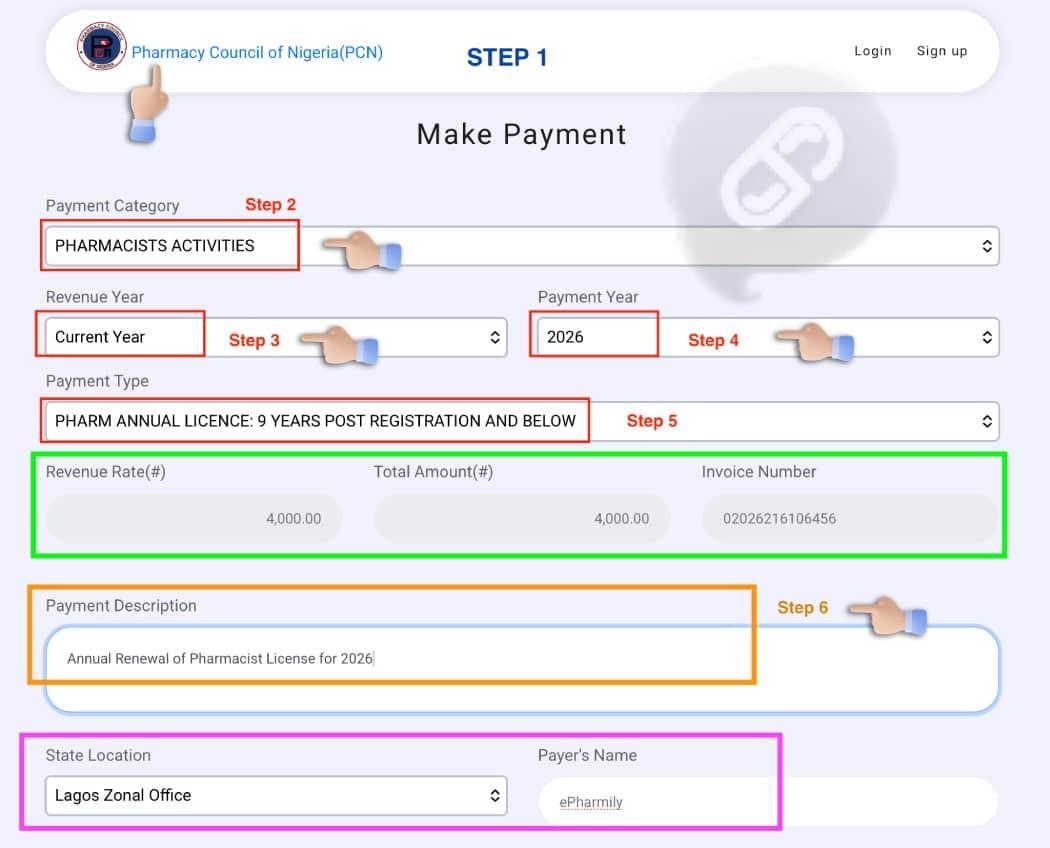
Step 1: Visit the PCN Payment Portal
Go to the official PCN payment portal:
👉 https://pay.pcn.gov.ng/
On the homepage:
- Click “Make General Payment.”
Step 2: Select Payment Category
- On the payment page:
- Locate “Payment Category.”
- Click the dropdown menu.
- Search and select “Pharmacist Activities.”
Step 3: Select Revenue Year
- Next:
- Click the dropdown under “Revenue Year.”
- Select the year you want to renew (usually the current year – 2026).
Step 4: Select Payment Year
Under “Payment Year”:
- Choose 2026 (or the applicable current year).
SEE: How to Verify a Pharmacist in Nigeria
Step 5: Select Payment Type (Very Important)
Click the dropdown under “Payment Type” and select the category that matches your years post-registration:
- Pharmacist Annual License: 9 years post-registration and below
- Pharmacist Annual License: 10–14 years post-registration
- Pharmacist Annual License: 15–39 years post-registration
- Other applicable categories
⚠️ Ensure you select the correct category to avoid underpayment or rejection.
Once this has been selected, the system will automatically display:
- Revenue Rate
- Total Amount &
- Invoice Number
🤩 At this point, you have successfully generated your invoice.
Step 6: Complete Payment Details
Now fill in the remaining information carefully.
On the Payment Description
- Type 👇
- Annual Renewal of Pharmacist License for 2026
(Replace 2026 with the applicable renewal year.)
Location
Select the state where you renewed your license in the previous year.
Payer’s Information
Enter: 👇
- Your full name
- Your phone number
- Your email address
SEE: Tips For New Pharmacist Graduates
Stakeholders Registration Number
- This refers to your PCN Registration Number (License Number).
Ensure it is entered correctly. - Confirm your email address before proceeding.
Step 7: Make Payment
Click “Pay Now.”
A pop-up window will appear asking you to select your preferred payment method:
- Online payment (card transfer)
- Bank payment
💰💳 Complete the transaction using your chosen method.
Step 8: Print Your Receipt and Invoice
After successful payment:
- Download and print your Payment Receipt
- Print the Generated Invoice
✌️ As these documents are required for physical verification.
Step 9: Visit Your State PCN Office for Verification
Take the following documents to your State PCN Office:
- Payment receipt
- Invoice
- The current year, pharmacist annual payments dues ( check : https://pharmagateway.com.ng for all your dues).
Your payment will be verified and approved.
Step 10: Collect Your Annual PCN Scratch Card
Once verification is completed, you will be issued your Annual PCN Scratch Card, confirming that:
✅ Your annual license has been renewed
✅ You are legally authorized to practice for the year
‼️⚠️ Login to your PCN core dashboard and activate the current year license with the PCN Scratch Card.
💃 Congratulations — you have successfully completed your PCN annual license renewal process.
SEE: PEP Exams Past Questions and answers
key 🔑 Things to Note
- Always renew early to avoid penalties.
- Ensure your email and phone number are correct.
- Keep copies of all receipts and documents.
- Visit only official PCN offices for verification.
⁉️ Frequently Asked Questions (FAQs)
1. Is PCN annual renewal compulsory?
Yes. Every licensed pharmacist in Nigeria must renew annually to remain in good standing.
2. Can I pay online without visiting the state office?
No. Physical verification at your state PCN office is still required after payment.
3. What happens if I fail to renew?
You may face penalties, suspension, or inability to legally practice pharmacy.



Ads.
Ads.
Categorie
Leggi tutto
In the year 2055, the world had come to rely on technology like never before. The sky was dotted with drones, cities buzzed with self-driving cars, and in the medical field, artificial intelligence and automation had become the bedrock of healthcare. This was a "World without Pharmacists" People no longer felt the need to physically visit doctors or pharmacies; everything could be done with...
In the ever changing world of pharmacy professional, staying connected, informed and up to date is key to success. Whether you're a pharmacist, pharmacy technician, researcher, or student, having a dedicated platform that fosters collaboration, knowledge-sharing, and career growth is invaluable. That’s where ePharmily comes in. Hence, in this article we will explores the reasons why...

Australia 🇬🇧 is home to some of the world’s leading universities, and it continues to be a popular destination for international students pursuing a career in pharmacy. Studying pharmacy in Australia offers a diverse and dynamic learning environment, state-of-the-art facilities, and opportunities to gain practical experience in one of the best healthcare systems globally. If...

With the rise in technology and changes, I believe the right question should be, can I recommend someone to study Pharmacy today ? From my experience, this answers comes in both ways, as this depends on your career goals, interests, what field you wish to go into and the current region or county of practice. Therefore my answer is a "96%" - NO, and "4%" - YES. Why i choose NO!? my...

As I reflect on my journey over the last 40 years in the world of pharmacy, I can’t help but feel an overwhelming sense of gratitude and accomplishment. From the early days of preparing medications by hand to the high-tech, data-driven landscape we navigate today, the evolution of pharmacy has been remarkable. But beyond the advancements in technology, it’s the personal growth,...